
Mac 클러스터링의 혁명: 썬더볼트 브릿지로 구현한 35Gbps 초고속 AI 네트워크 테스트
최근 맥스튜디오와 맥북을 연결해 로컬 LLM 클러스터를 구축하며 가장 고민했던 부분은 '네트워크 병목'이었습니다. 아무리 성능이 좋아도 기기간 데이터를 주고받는 속도가 느리면 분산 추론은 의미가 없기 때문입니다.
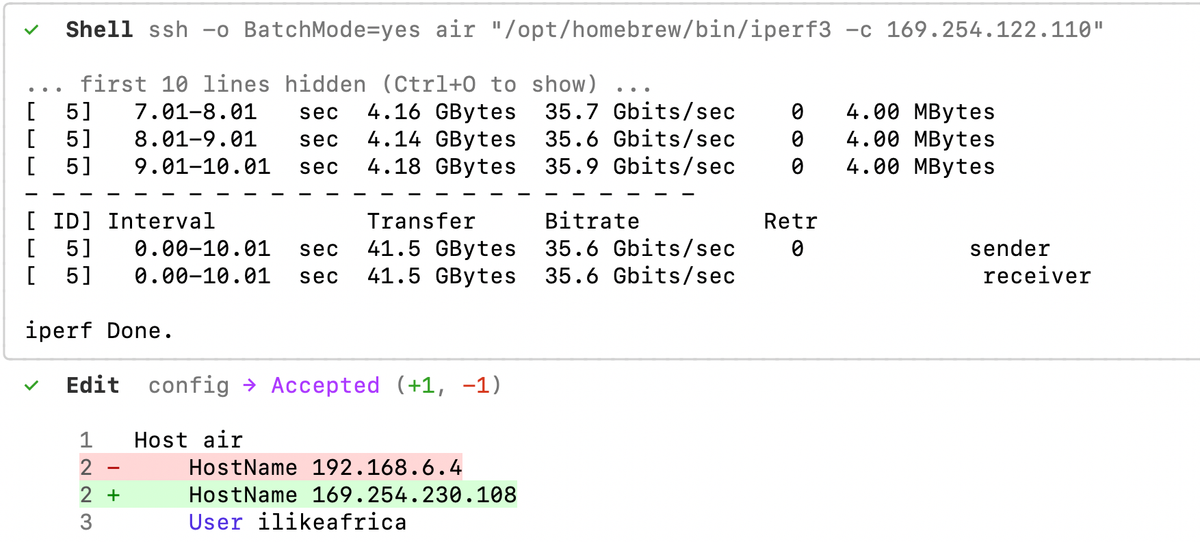
직접 iperf3를 통해 썬더볼트 브릿지의 실제 대역폭을 측정한 결과, 경이로운 수치가 확인되었습니다.
📊 대역폭 측정 결과: Wi-Fi vs Thunderbolt
- 기존 Wi-Fi (192.168.6.x): 약 400 Mbps (초당 50MB)
- 썬더볼트 전용 IP (169.254.x.x): 약 35.6 Gbps (초당 4.45GB)
🚀 결과 요약 및 체감 성능
측정된 35.6 Gbits/sec는 일반 기가비트 이더넷보다 35배, Wi-Fi보다 90배 빠릅니다. 이는 Mac 내부의 고성능 PCIe SSD 읽기 속도와 맞먹는 수준으로, 두 대의 Mac이 사실상 하나의 메인보드에 연결된 것처럼 동작함을 의미합니다.
🛠 실전 적용: SSH 및 파일 전송 속도 극대화
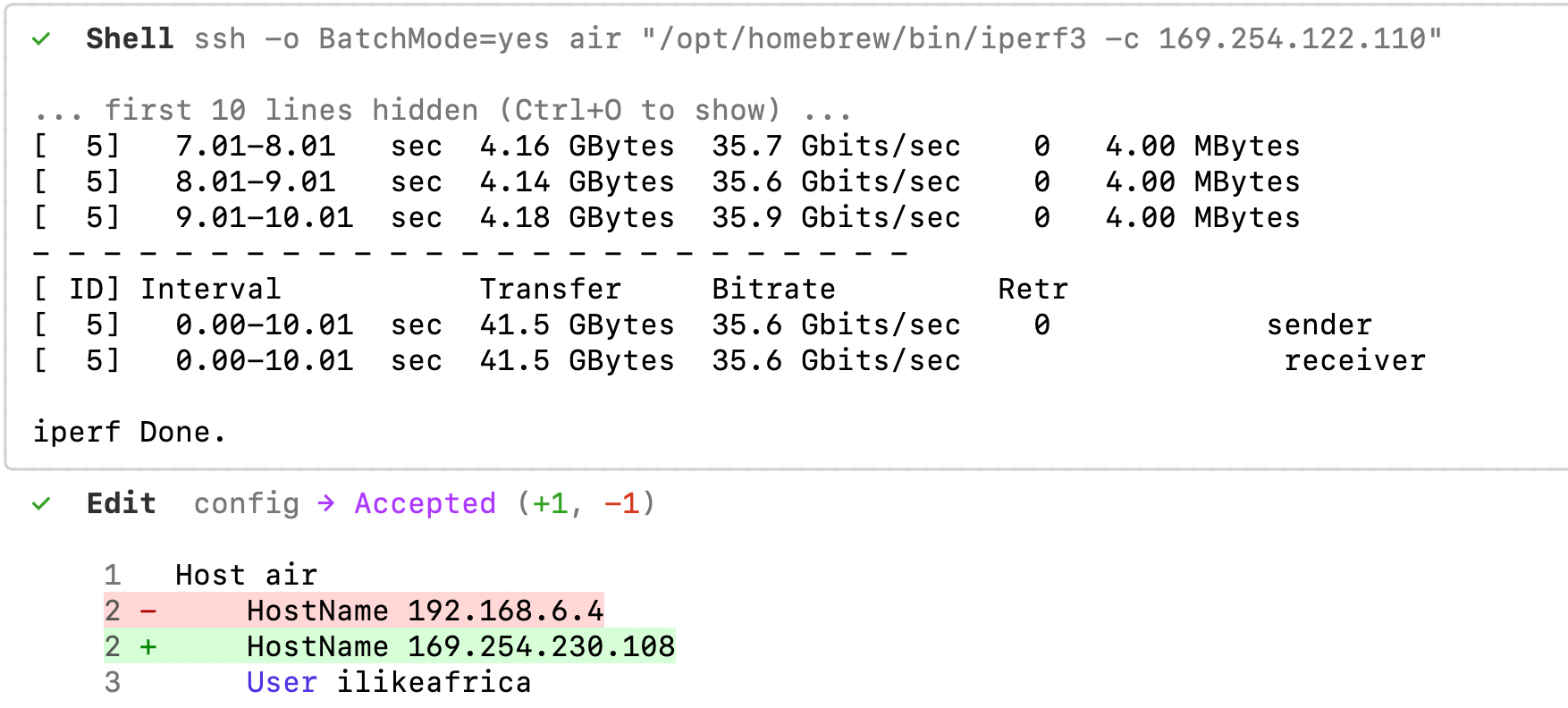
이 속도를 즉각 활용하기 위해 ~/.ssh/config 설정을 변경했습니다. 이제 ssh air로 접속하거나 파일 전송(SCP) 시 무조건 40Gbps 라인을 타게 됩니다.
💡 이 대역폭이 LLM 클러스터링에 주는 의미
- 병목 없는 분산 추론: Llama.cpp의 RPC 기능을 사용할 때 레이어 간 데이터 전송 지연이 사실상 사라집니다. 맥스튜디오의 VRAM이 부족한 초거대 모델(예: 120B+) 구동 시 맥북의 VRAM을 내장 메모리처럼 활용할 수 있습니다.
- 모델 파일 실시간 공유: 50GB가 넘는
.gguf파일을 기기마다 복사할 필요가 없습니다. NFS/SMB로 연결된 네트워크 볼륨에서 직접 읽어도 로컬 디스크와 속도 차이가 없습니다. - 지연 시간 제로 마이크로서비스: 벡터 데이터베이스나 API 서버를 분리해도 레이턴시가 1ms 이하로 유지되어 완벽한 분업이 가능합니다.
이제 하드웨어 준비는 끝났습니다. 본격적인 다중 모델 파이프라인 세팅을 시작해 보겠습니다.
Title: Breaking the Barrier: Achieving 35Gbps with Thunderbolt Bridge for Mac AI Clustering
When building a local LLM cluster with a Mac Studio and MacBook, the biggest concern is always the network bottleneck. Distributed inference loses its edge if data transfer between nodes can't keep up with compute speeds.
I conducted a bandwidth test using iperf3 over a Thunderbolt Bridge, and the results were nothing short of extraordinary.
📊 Benchmark Results: Wi-Fi vs. Thunderbolt
- Standard Wi-Fi (192.168.6.x): ~400 Mbps (50MB/s)
- Thunderbolt Dedicated IP (169.254.x.x): ~35.6 Gbps (4.45GB/s)
🚀 Analysis: Real-World Performance
At 35.6 Gbits/sec, this connection is 35x faster than Gigabit Ethernet and 90x faster than Wi-Fi. This speed rivals high-end internal PCIe SSDs, effectively turning two separate Macs into a single unified system with a "very long motherboard bus."
🛠 Immediate Optimization: SSH & File Transfer
To leverage this speed, I updated my ~/.ssh/config. Now, all SSH sessions and file transfers via SCP automatically route through the 40Gbps Thunderbolt line.
💡 Strategic Impact on LLM Clustering
- Seamless Distributed Inference: Using RPC in Llama.cpp, the latency between passing layers disappears. You can leverage the MacBook's VRAM as if it were internal to the Mac Studio for massive 120B+ models.
- Instant Model Sharing: No need to duplicate 50GB
.gguffiles. Reading from a network volume (NFS/SMB) is now as fast as a local disk. - Sub-1ms Microservices: Running a vector DB (like Qdrant) or PostgreSQL on a secondary node is now viable with latency under 1ms, enabling true workload distribution.
The infrastructure is ready. Next up: Setting up the multi-model pipeline.
#MacStudio #MacBookAir #ThunderboltBridge #Networking #LLM #AI-Clustering #iperf3 #AppleSilicon #LocalLLM #HomeServer