네이버 블로그를 워드프레스로 이전하는 방법
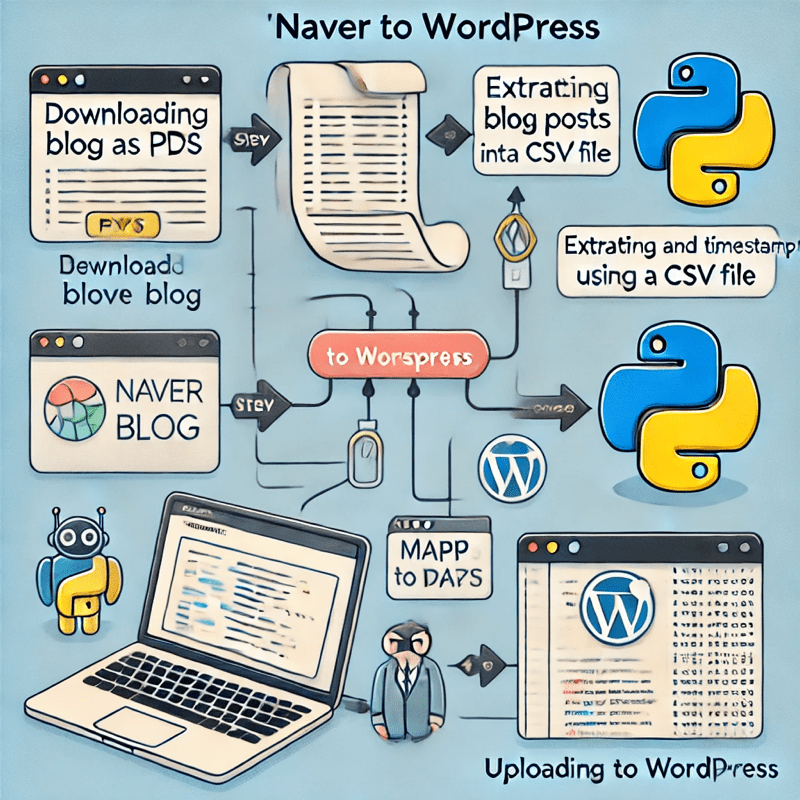
네이버 블로그를 워드프레스로 이전하는 가장 편한 방법은 역시 업체를 이용하는 방법이겠다.
하지만 조금만 생각해보면 혼자서 어렵지 않게 할수 있었다.
혹시나 그래도 안된다 싶으면 돈 받고 해 드릴테니 연락 주세요…냐하하하 ( ilikeafrica@gmail.com, 100건당 만원)
- 네이버 블로그 관리 메뉴에 가면 글 저장이라는 메뉴에서 한번에 100개씩 pdf 로 저장 후 다운로드.
- pdf 내용중에 시간과 url 만 추려내서 csv나 txt 파일로 저장
- 파이선으로 해당 url 과 시간을 맴핑 시켜서 내 워드프레스로 업로드
- 워드프레스 업로드전 워드프레스에서 api 사용이 가능해야 하고 app password가 발급 되어 있어야 함.
- pdf 파일에서 날짜를 추려내지 않으면 날짜 입력이 모조리 업로드 하는 당일 날짜로 맵핑 되는 사건이 자주 발생.
- 300개 정도 글 가지고 오는데 1시간 정도 소요.
- 네이버 블로그에 있는 사진은 일단 내 디스크에 임시로 다운로드 하는 방식.
- 스크립트 만들때 중복 게시물 방지 함수도 만들면 편함.
https://blog.naver.com/mrcrazy1

영어 번역 (English Translation)
The easiest way to migrate a Naver blog to WordPress is, of course, to use a service provider.
However, with a little thought, I realized I could do it myself without much difficulty.
If you still find it too challenging, I can do it for you for a fee… Haha! (ilikeafrica@gmail.com, 10,000 KRW per 100 posts)
1. Go to the Naver Blog Management menu and use the Save Posts feature to download up to 100 posts at a time as PDF files.
2. Extract only the timestamps and URLs from the PDF files and save them as a CSV or TXT file.
3. Use Python to map the URLs and timestamps and upload the posts to WordPress.
4. Before uploading to WordPress, make sure that API access is enabled and that an App Password has been generated.
5. If timestamps are not extracted from the PDFs, all posts may end up being mapped to the upload date instead.
6. Migrating about 300 posts takes approximately one hour.
7. Images from the Naver blog are first downloaded to a local disk before being uploaded.
8. It is useful to implement a duplicate post prevention function when creating the script.
독일어 번역 (Deutsche Übersetzung)
Der einfachste Weg, einen Naver-Blog auf WordPress zu migrieren, ist natürlich die Nutzung eines Dienstleisters.
Aber mit ein wenig Überlegung habe ich festgestellt, dass ich es selbst ohne große Schwierigkeiten tun kann.
Falls es trotzdem nicht klappt, kann ich es gegen eine Gebühr für dich erledigen… Haha! (ilikeafrica@gmail.com, 10.000 KRW pro 100 Beiträge)
1. Gehe zum Naver Blog Management-Menü und nutze die Funktion Beiträge speichern, um bis zu 100 Beiträge auf einmal als PDF-Dateien herunterzuladen.
2. Extrahiere nur die Zeitstempel und URLs aus den PDF-Dateien und speichere sie als CSV oder TXT.
3. Verwende Python, um die URLs und Zeitstempel zuzuordnen und die Beiträge auf WordPress hochzuladen.
4. Vor dem Hochladen auf WordPress stelle sicher, dass der API-Zugriff aktiviert ist und ein App-Passwort generiert wurde.
5. Falls die Zeitstempel nicht aus den PDFs extrahiert werden, könnten alle Beiträge fälschlicherweise auf das Upload-Datum gesetzt werden.
6. Die Migration von ca. 300 Beiträgen dauert etwa eine Stunde.
7. Bilder aus dem Naver-Blog werden zunächst lokal auf die Festplatte heruntergeladen, bevor sie hochgeladen werden.
8. Es ist nützlich, eine Funktion zur Vermeidung doppelter Beiträge in das Skript zu integrieren.